
QA Lab Automation: End-to-End Sample Logistics and Testing
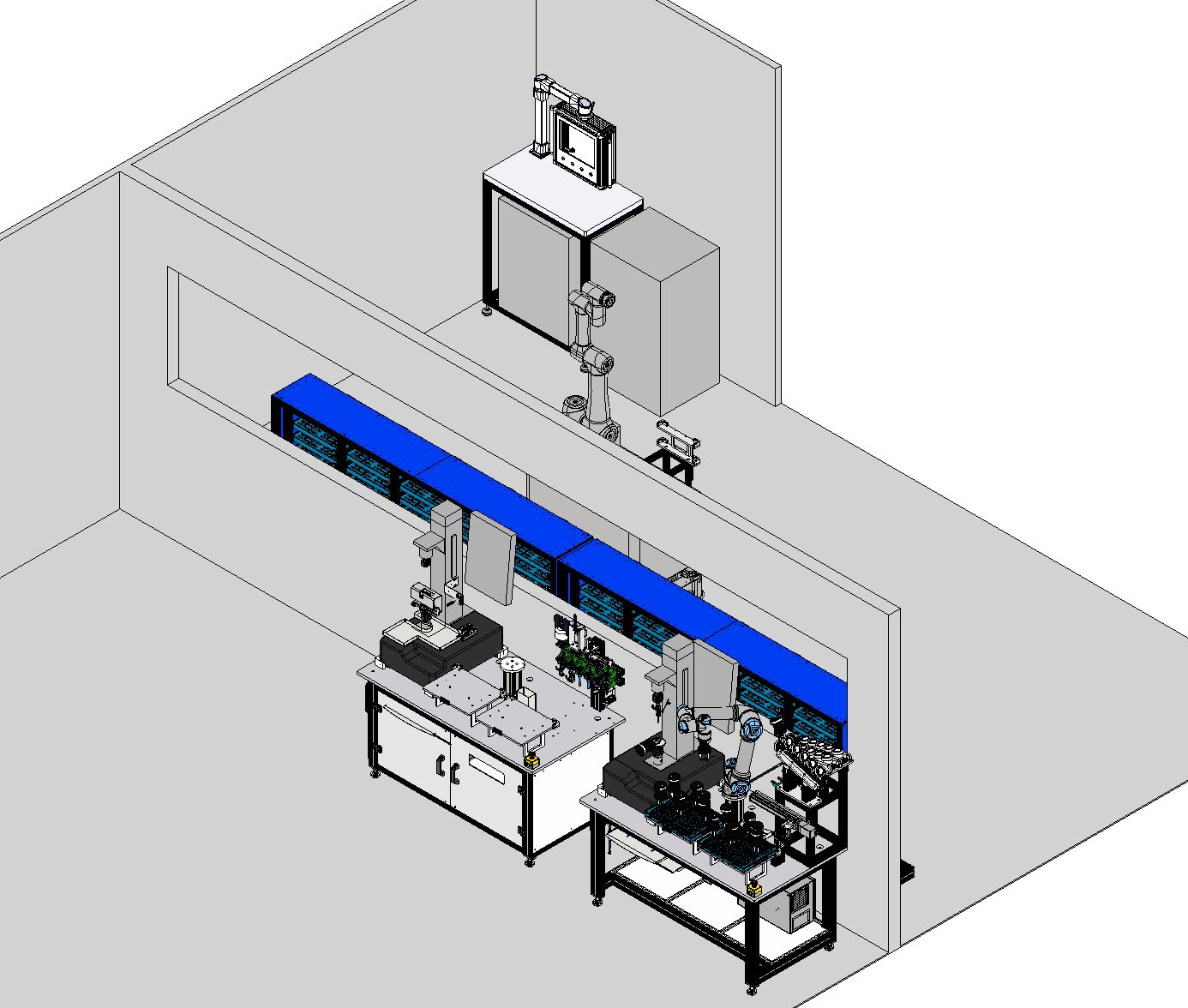
Motionwell delivers fully integrated QA laboratory automation by combining autonomous mobile robots (AMR), collaborative robots (Cobot), machine vision, and a PLC-native control architecture. The goal is simple: move samples, execute tests, and manage data with predictable traceability and minimal manual handling.
This solution is designed for high-throughput QA environments that run multi-station material testing and require consistent sample identity, scheduling, and results management.
What Problem This Solves
| Common lab challenge | What it looks like in daily operation | How we address it |
|---|---|---|
| Limited staffing for repetitive work | Operators spend time walking samples instead of running experiments | AMR + Cobot handles transport and loading steps |
| Traceability gaps | Sample IDs and test files don’t match or require manual renaming | System enforces sample states, IDs, and file naming rules |
| Low throughput under peak demand | Single-station bottlenecks and manual queuing | Multi-station orchestration and automated dispatch |
| Variable test mix | Different sample forms and test methods increase changeover | Configurable EOAT, fixtures, and software-driven routing |
| Complex IT footprint | Traditional solutions depend on heavy MES/LIMS customization | PLC-native lightweight WMS patterns where appropriate |
System Architecture (AMR + Cobot + Vision + Test Cells + PLC-WMS)
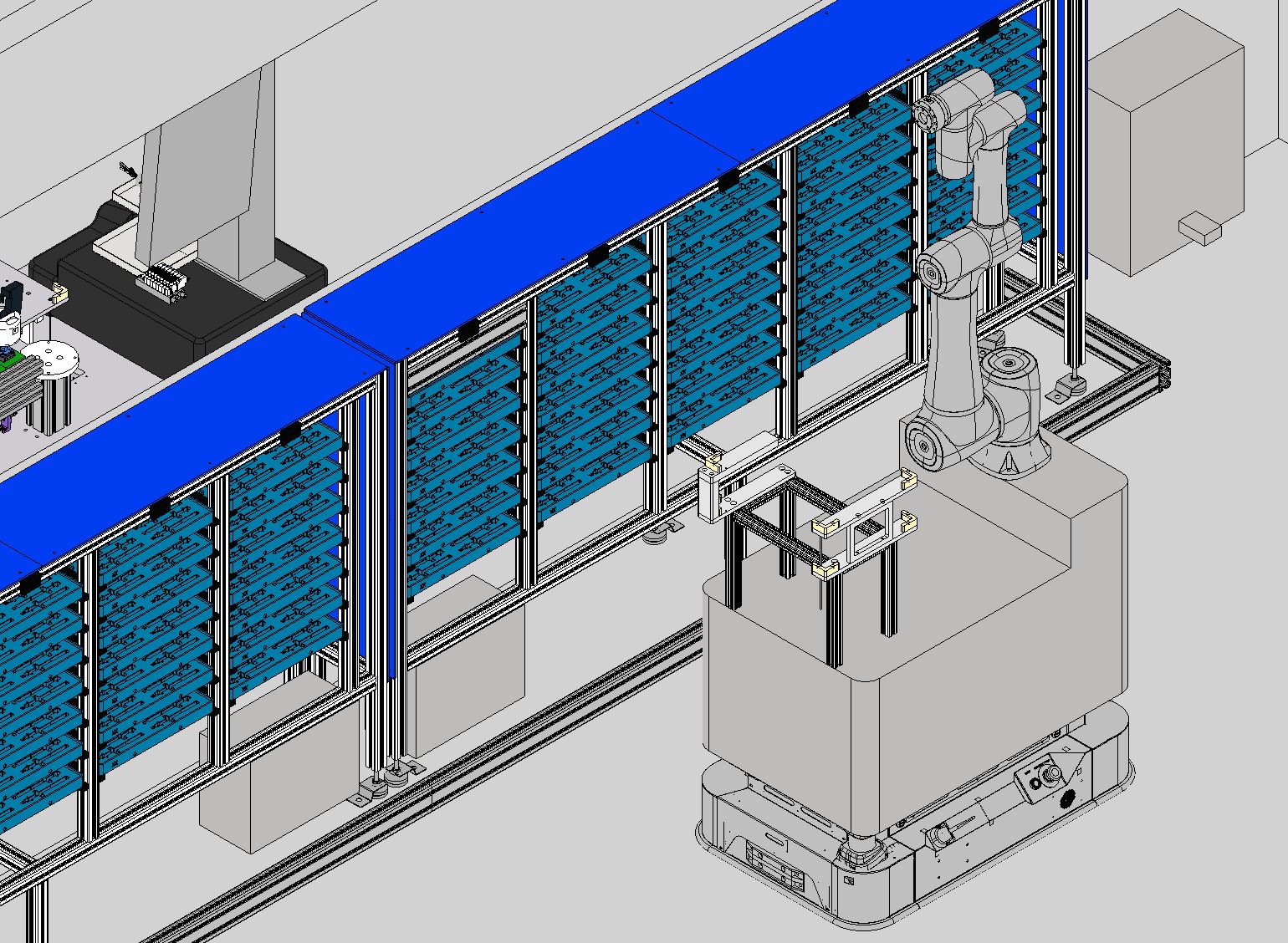
The system integrates mobile transport, manipulation, perception, test execution, and state management into one workflow.
| Subsystem | Typical technology | Primary responsibility | Integration touchpoints |
|---|---|---|---|
| Mobile transport | MiR AMR class platform | Autonomous navigation and dispatch execution | Fleet/task API, station docking, status feedback |
| Manipulation | Universal Robots collaborative arm | Tray pick/place and sample handoff | Gripper I/O, safety I/O, station handshake |
| Perception | Industrial vision system | Tray identification and position compensation | Vision-to-robot offsets, verification checks |
| Testing | Instron universal testing machines | Execute tensile/compression/flex tests | Start/stop, parameter setting, result export |
| Orchestration | PLC-based lightweight WMS | Inventory, scheduling, and state machine | Work orders, sample states, error recovery |
Workflow: From Sample Registration to Result Upload
| Step | Automated action | Data handled |
|---|---|---|
| Sample registration | Sample is assigned an ID and a storage/test routing plan | Sample ID, batch/lot metadata, required test method |
| Inventory assignment | System assigns a rack position and marks state as “stored” | Rack location, state, timestamp |
| Dispatch to test | AMR receives a mission and navigates to storage and the target station | Mission ID, destination, robot status |
| Vision-assisted pick | Cobot verifies tray position and performs pick/place | Vision offsets, grip confirmation, verification result |
| Test execution | PLC coordinates test setup and start triggers | Test parameters, device ID, run status |
| Result handling | Test file is named consistently and uploaded to a server | File naming, paths, checksum/status |
| Return to storage | Samples are returned and inventory state is updated | Location, completion state, audit log |
Deep Integration With Instron Test Cells
| Function | Implementation |
|---|---|
| Zero reset | Automatic load cell zeroing before each test |
| Test speed | Test speed set based on sample type / recipe |
| Test start | Automated trigger after sample clamping confirmation |
| Data transfer | Product name, batch, line ID, device ID passed into the test flow |
| Result handling | Files are auto-named and uploaded to network storage |
Precision, Traceability, and Safety Design
| Topic | Design approach | Why it matters |
|---|---|---|
| Docking and handling tolerance | Mechanical docking + vision compensation + handshake checks | Prevents mis-picks and fixture damage |
| Traceability model | State machine in PLC with explicit sample states and audit timestamps | Eliminates “unknown sample” and ambiguous rework |
| Recovery logic | Retry rules, operator prompts, and safe fallback states | Keeps the lab running without silent failures |
| Safety architecture | Collaborative operation + station safeguarding where required | Supports mixed human/robot environments |
| IT/OT boundary | Clear responsibilities between PLC, robot fleet, and server storage | Makes validation and troubleshooting manageable |
Delivered Reference: Project P23078 (QA Lab Automation)
Project P23078 is a delivered high-throughput QA laboratory automation program that reflects the design principles above.
| Item | Project P23078 summary (high-level) |
|---|---|
| Industry | Lab automation / QA testing |
| Mobile manipulation | MiR AMR + Universal Robots cobot compound workflow |
| Storage | 70 positions rack (7 rows × 10 columns) managed as inventory |
| Test stations | Multi-station Instron test cell orchestration |
| Control architecture | PLC-native lightweight WMS for scheduling and state tracking |
| Data flow | Automatic result naming and upload to server storage |
System Specifications
| Parameter | Specification |
|---|---|
| Sample storage | 70 positions (7 rows × 10 columns) |
| Test stations | 2–6 Instron units (configurable) |
| AMR platform | MiR100/MiR250 class |
| Cobot arms | Universal Robots UR5e/UR10e class |
| Control system | Siemens S7-1500 / Allen-Bradley (project-dependent) |
| Communication | Ethernet/IP, PROFINET, OPC-UA (project-dependent) |
| Safety | ISO 13849 approach with collaborative zones (project-dependent) |
Typical Project Timeline
| Phase | Duration | Activities |
|---|---|---|
| Design | 4–6 weeks | Requirements, concept, detailed design |
| Manufacturing | 8–10 weeks | Component procurement, integration |
| FAT | 2 weeks | Factory acceptance testing |
| Installation | 2–3 weeks | On-site installation and commissioning |
| Validation | 2–4 weeks | IQ/OQ/PQ support and training |
Typical end-to-end delivery window: 18–25 weeks, depending on station count and validation depth.
Frequently Asked Questions
| Question | Answer |
|---|---|
| Can the system work with testing machines other than Instron? | Yes. We can integrate other universal testing machines (for example ZwickRoell, MTS, or Shimadzu) when the control interface and result export format are defined. The key is a stable handshake protocol and a validated state machine. |
| What sample types can the system handle? | The handling strategy is driven by trays, fixtures, and EOAT. Common configurations cover tensile bars, compression specimens, and flex samples, and we design custom tooling when sample geometry requires it. |
| How does the system handle failures or test errors? | The control layer tracks explicit sample states and device states. Fault recovery typically includes verified re-tries, operator notification steps, and a “safe hold” state so traceability remains intact even when a test fails. |
| What data is captured and how is it accessed? | Typical outputs include sample ID, batch/lot, test parameters, device ID, and the test result file exported to network storage. The structure can be aligned to LIMS requirements when needed. |
| What ongoing support do you provide? | Support options include preventive maintenance, remote diagnostics, spare parts planning, and controlled software updates. We also provide refresher training so operators and maintenance teams can handle routine recovery steps confidently. |
If you want to scope a QA lab automation program in Singapore, reach out at /contact/ and share your test station list and sample flow.
Related content: QA Lab Automation Benefits | AMR Solutions | Material Handling | Digital & Data Integration